← Releases
Release 2026.2
New year, new dimension in order scheduling:
With the February release, SEQUIQ’s multi-line planning takes center stage – for the first time, you can optimize order sequences and line assignment in a single step.
New configuration options in automatic sequencing give you even more control over your optimization.
Read on to learn more!
Look forward to the following highlights:
- SEQUIQ Multi-Line Planning
- Separate Prioritization of Sequencing Rules
- Utilization-Oriented Sequencing with the SEQUIQ Order Backlog
Customers with Long Term Support (LTS) will receive the new features with the next LTS release in March 2026.
Optimize / Order Sequence II (automatic)
SEQUIQ Multi-Line Planning
After months of intensive development, we are pleased to introduce a new dimension in planning: SEQUIQ Multi-Line Planning.
For the first time, it enables you to optimize the sequences of multiple parallel lines simultaneously – while dynamically determining the best possible assignment of orders to those lines. What was previously treated as a fixed constraint is now part of the optimization itself, unlocking entirely new potential for production environments with parallel lines or line segments.
The Workflow for Your Planning
1. Start Planning: Load Multiple Lines at Once
As usual, planning starts in the SEQUIQ order backlog. What’s new is that you can now load multiple parallel lines simultaneously into the planning process. SEQUIQ uses so-called reference stations to represent different lines or line segments.
2. Stay in Control: Seamless Switching Between Sequences
During order scheduling, you can easily switch between lines and their corresponding sequences using the new jump function in the SEQUIQ status bar. At a glance, you can see which orders are assigned to which line, how many orders are planned in total, and how well the sequencing rules are being met.
3. Optimize: Intelligently Optimize Sequences and Line Assignment
Before each automatic sequencing run, you can now decide per loaded line whether SEQUIQ should optimize only the sequence or additionally the line assignment of the orders. This allows you to precisely control how flexible the system is allowed to plan.
At the same time, your rule sets apply in the background. These define which sequencing rules are valid for which lines (reference stations), ensuring that rules are considered only where they are technically and operationally relevant.
With the new “Assignment” rule type, you can also specify which orders are allowed to be produced on which lines – for example, when special equipment or qualified personnel are required but not available everywhere.
Using the star weighting, you control the priority of the rule and can model both strict constraints and softer line preferences.
Of course, manual control remains fully available: you can move orders between lines at any time manually to best achieve your planning objectives.
4. Finalize Planning: Detailed Analysis and Saving
After optimization, the program analysis provides an immediate overview of how the orders are distributed – for example, how many orders of a certain type are assigned to the early shift. Simply select the desired reference station in the status bar and start the detailed analysis.
When saving your scheduling, you automatically receive a clear tabular overview per reference station, including order counts and rule compliance.
5. Cross-Line Configuration: Centrally Define Optimization Freedom
For environments with parallel line structures, you can centrally define in the administration module whether and how SEQUIQ is allowed to change line assignments.
For each reference station, you specify whether orders may be reassigned automatically, manually only, or not at all.
This gives you full control over how much automation is desired – and ensures that SEQUIQ plans strictly within the framework you define.
Conclusion
The new multi-line planning elevates planning to a new level: you consider multiple lines simultaneously, perform intelligent and flexible optimizations, and always remain compliant with all rules and constraints.
The new functionality is now available in the Multi-Line Planning module.
Feel free to contact us and discover the new possibilities for your planning!
Optimize / Order Sequence II (automatic)
Separate Prioritization of Sequencing Rules
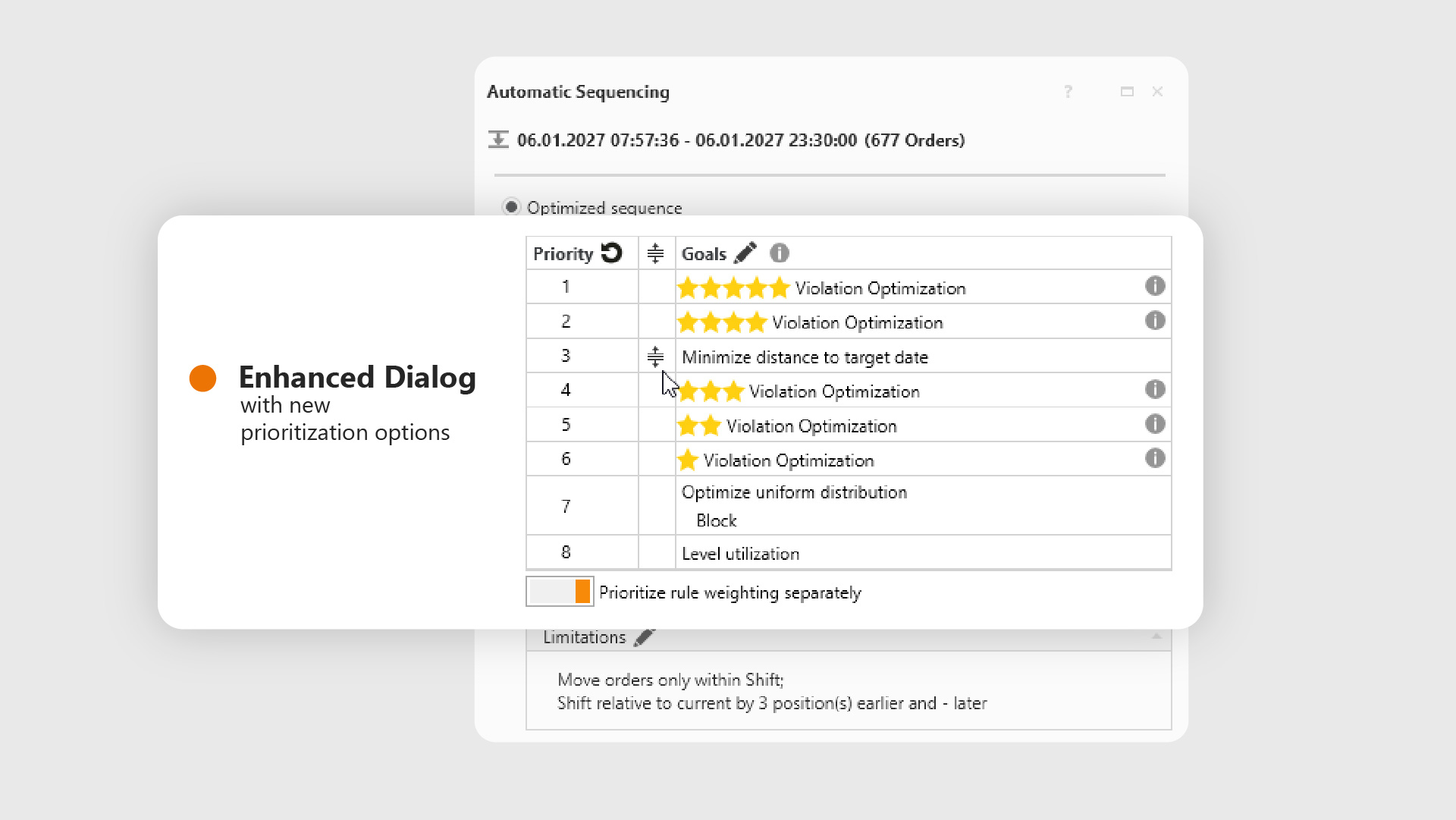
With the new release, you gain even more control to tailor sequencing precisely to your requirements. You can now define exactly how additional sequencing objectives (e.g. utilization leveling or uniform distribution) are prioritized in relation to star-rated sequencing rules.
Why is this useful?
Previously, star-rated rules were generally weighted either above or below optimization objectives such as uniform distribution or minimizing distance to the target date. With the new functionality, you can now position additional sequencing goals explicitly between different star levels.
Example:
A utilization-intensive feature should be evenly distributed throughout the day to avoid peaks. In this case, uniform distribution is more important for your planning than complying with 3-star rules — while highly critical 4- or 5-star block rules should still retain top priority.
This level of fine-grained control is now possible.
How does it work?
In the automatic sequencing configuration dialog under Optimize / Automatic Sequencing, a new button is available: “Prioritize rule weighting separately.”
Once activated, SEQUIQ creates a dedicated priority row for each star level used.
You can then reorder these priority rows via drag & drop – for example, placing uniform distribution above the 3-star rules but below the 4-star rules. This allows you to flexibly adapt the optimization logic to your specific planning needs.
Try it out and experience the new level of control!
Document / Order Backlog
Utilization-Oriented Sequencing with the SEQUIQ Order Backlog
With SEQUIQ, you can generate optimal production sequences in seconds – ensuring a stable production flow. In addition to classic sequencing rules such as density, the utilization of workplaces is also taken into account.
With the current release, this utilization-oriented approach is now seamlessly integrated into the “Order Scheduling with the SEQUIQ Order Backlog” workflow.
Considering Line Balancing During Order Scheduling
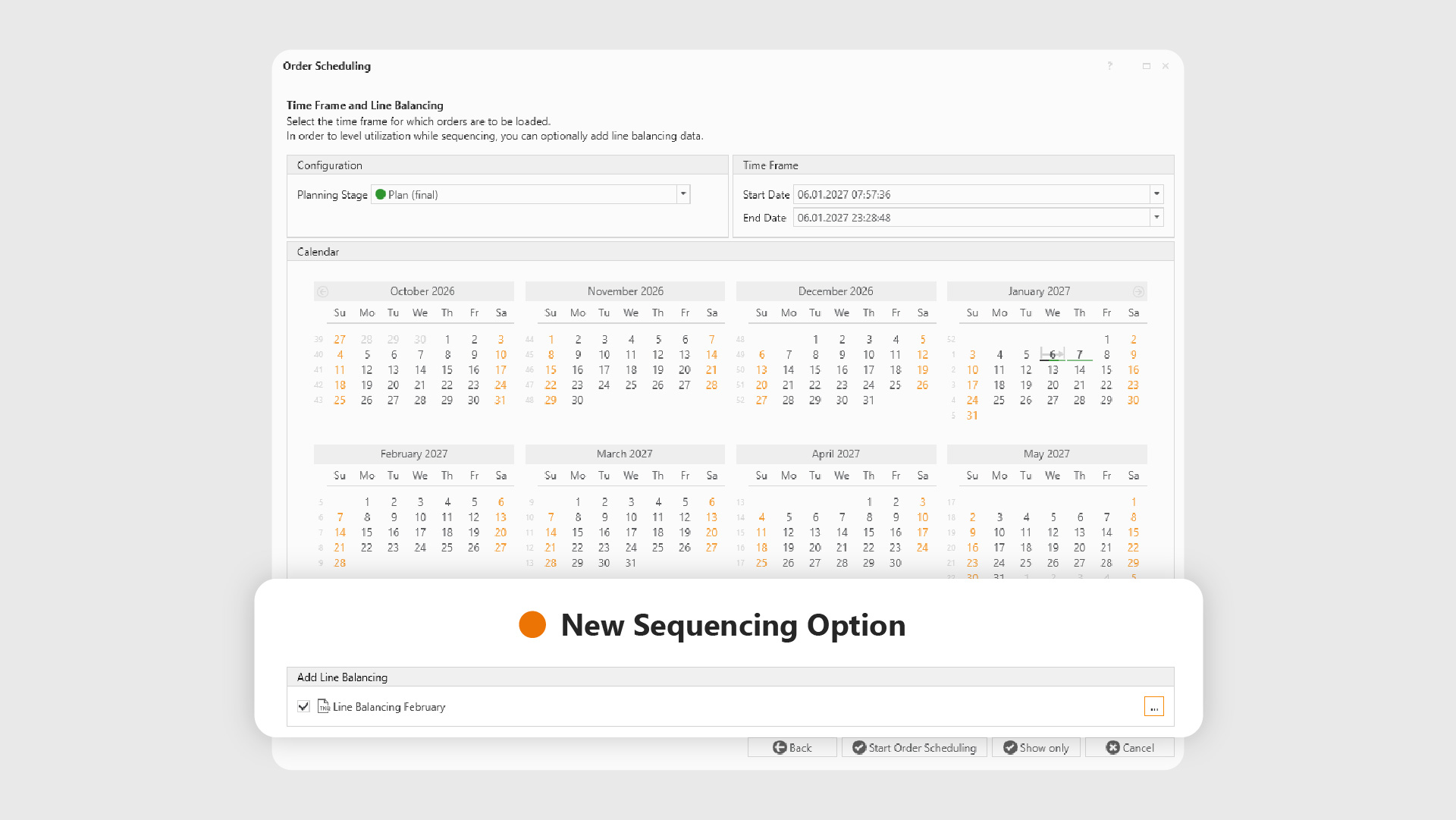
Under Document / Start Order Scheduling, you select the desired scheduling period as usual.
What’s new: You can now directly load a line balancing – either as a TKQ file or directly from a plan state or project.
As always, SEQUIQ remembers your last configuration so you can start the next planning run even faster.
Once a line balancing is loaded, the additional option “Level Utilization” becomes available under Optimize / Automatic Sequencing.
During optimization, SEQUIQ then ensures a balanced distribution of utilization, even across a wide variety of variants.
In addition, the Drift Analysis (Analyze / Drift Analysis) is available. It provides a clear overview of drift behavior per workplace and helps you identify potential issues – such as drift limit violations – at an early stage.
Available for whom?
These enhancements are available immediately to all users who have the Scheduling and Utilization Leveling modules enabled.
Would you like to try out the new capabilities or learn more?
Feel free to contact us – we’re always happy to support you!

Further Improvements
- Central Rule Management in the Administration Module: From now on, rule sets and their associated sequencing rules for the planning area can be created, edited, and deleted centrally in the administration module. It is also always visible which user last modified a rule set and at what time. All adjustments can now be made directly and without having to load orders beforehand.
(Document / Sequencing Rules)
All SEQUIQ Modules at a Glance
Expand SEQUIQ flexibly with our modules. Customize the solution to your individual production and achieve maximum benefit for your specific requirements.


